Your AI second brain
for every link you save.
Capture from anywhere on the web. Cryptie auto-tags from the page context and the vocabulary you already use—so a library of thousands stays organized without filing.
Then connect your AI assistant. Claude, ChatGPT, Grok, Hermes and Meta Muse plug in over MCP, no API key — or wire in Claude Code, Obsidian, n8n, and any HTTP client with one REST API and Bearer token. Search it with tag: and domain: in the app, or let your agent ask for it directly.
AI auto-tagging • MCP for Claude, ChatGPT, Grok & more • REST API • Chrome extension • Built for huge libraries
look at again?
And let your agents use them.
Zero filing.
Read & write. One API.
AI-curated bookmarks
your agents can use.
Cryptie sorts every link you save with your own tag vocabulary — no filing, ever. Then Claude, ChatGPT, n8n, and Obsidian plug into the same library through one API: they search it, and they save back to it. One collection, curated by AI, shared with your AI.
Build yours free →Tiago Forte's second brain runs on four steps: capture, organize, retrieve, and express. Link Crypt does all four for the URLs you collect — and now your AI assistants share the same library.
Save from anywhere
Chrome extension, iOS share sheet, web app, or POST /links from an agent — one click puts a URL into the same crypt.
Cryptie auto-tags
Built-in AI reads page context and proposes tags from your existing vocabulary, so new saves slot into your system instead of piling up untagged.
Search that scales
Combine tag:ai, domain:github.com, and title: filters. Built for libraries in the hundreds or thousands.
Feed your AI
Claude, ChatGPT, Grok, Hermes and Meta Muse connect over MCP. Claude Code, Obsidian, n8n, and anything HTTP get read/write access via one Bearer token — same library either way.
Save links instantly from any page
One-click saving from any webpage. Add tags, notes, and organize as you browse—works seamlessly across all your devices.
Add to Chrome — It's Free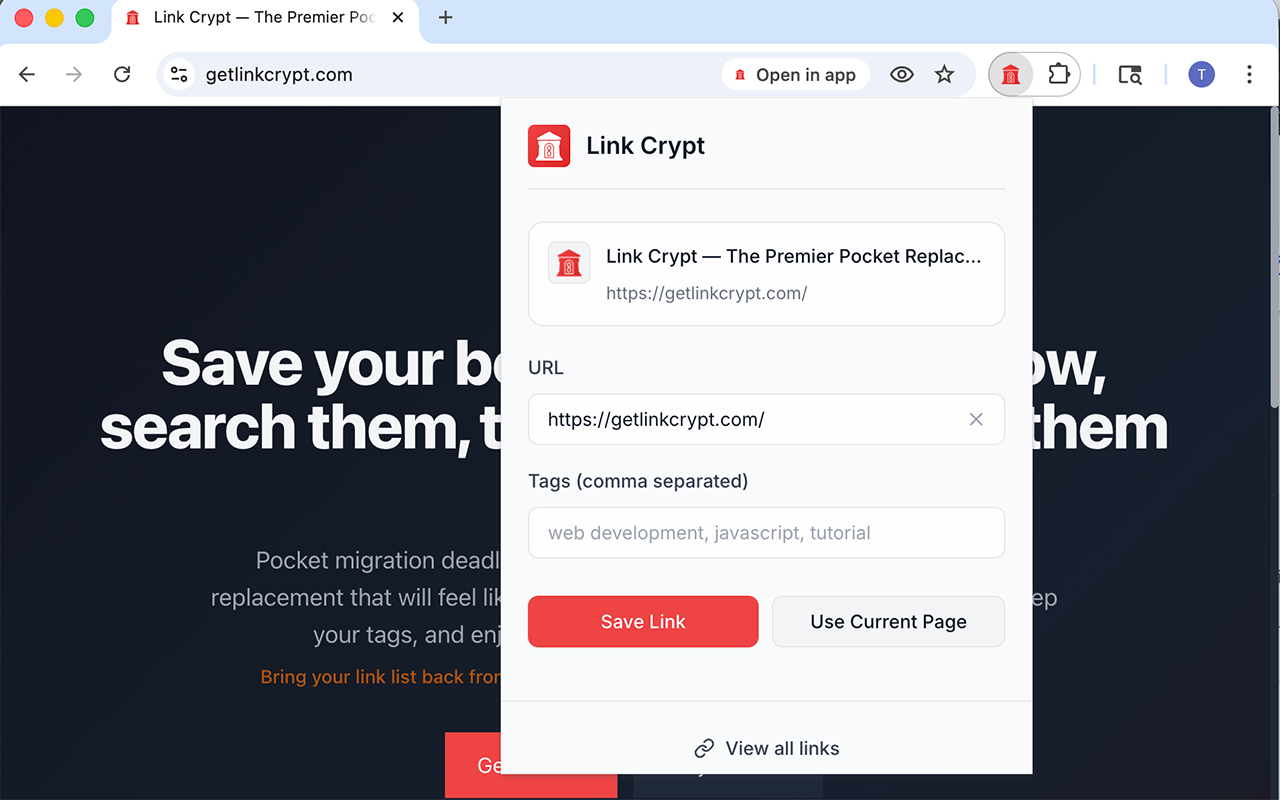
People who collect lots of links and want them back on demand — surfaced by their AI when it matters, not buried in folders.
Source lists, interview refs, background reading — tag by beat or story, then run domain: or tag: when you're on deadline.
Competitors, specs, user research — keep everything labeled and pull tag:competitor or domain: in one search.
Datasets, papers, dashboards — large libraries stay usable when filters combine (e.g. tag:ai domain:arxiv.org).
Obsidian for notes, Claude / ChatGPT for reasoning, Link Crypt for URLs — wire the API and your agents save, search, and tag links without copy-paste.
Sign up with email or magic link, install the Chrome extension, and pull in your old bookmarks from Chrome, Safari, Firefox, Edge, Pocket, Instapaper, or 10+ other services.
AI auto-tagging reuses your existing tag vocabulary on every new save. Browse and refine with tag: and domain: filters as the library grows.
Connect Claude, ChatGPT, Grok, Hermes or Meta Muse over MCP, or mint a Bearer token for Claude Code, Obsidian, or any HTTP client. Same library — no copy-paste.
Connect over MCP and your assistant searches, saves, and tags links in your crypt — sign in once, approve, done. No API key to copy.
MCP for Claude, ChatGPT, Grok, Hermes and Meta Muse, one Bearer token for everything else — every tool you already think with wires into the same library.
What is an “AI second brain” and how is Link Crypt one? +
The second brain idea (Tiago Forte) is an organized, searchable store of everything you capture from the web. In the AI era, that store is also the context your agents read. Link Crypt is the URL layer of a modern second brain: capture from the Chrome extension or any HTTP client, organize with Cryptie's auto-tagging, retrieve with tag: / domain: search, and express by giving Claude Code, ChatGPT Actions/Codex, Obsidian, and any agent live read/write access to the same library.
What makes Link Crypt different from other bookmark managers? +
Link Crypt is an AI-organized link library built for retrieval at scale: Cryptie auto-tags every save from your existing vocabulary, you query with tag:ai domain:github.com, and a full REST API lets Claude Code, ChatGPT Actions/Codex, Obsidian, and your agents read and write the same library. Classic read-later apps optimize for in-app reading; we optimize for finding and feeding your AI.
Why not just use browser bookmarks? +
Built-in bookmarks break down when you have hundreds or thousands of URLs: shallow search, awkward folders, no portable query syntax, and no API for agents or automation. Link Crypt gives you structured tags, tag:/domain: search, cross-device sync, and programmatic access — so large libraries stay usable.
Who is Link Crypt for? +
Anyone who saves a lot of links and needs them back fast — journalists and writers, product and UX folks, analysts and researchers, and people wiring links into Obsidian, agents, or a second brain. If "where did I save that?" is a recurring question, Link Crypt is built for you.
Can I import my existing bookmarks? +
Yes! Link Crypt supports imports from Pocket, Instapaper, Raindrop.io, Pinboard, GoodLinks, Readwise, browser bookmarks, and 10+ other services. All tags and metadata are preserved during import. Exporting from your browser? Follow the HTML bookmark export guide.
How does Link Crypt's advanced search work? +
Use precise filters like tag:javascript, domain:github.com, title:tutorial, or description:api. Combine filters for surgical precision: tag:ai domain:arxiv.org finds all AI research papers instantly.
Is my data private and exportable? +
Absolutely. No social features, no ads, no data mining. Your links stay completely private. Export to CSV or JSON anytime—we'll never hold your data hostage.
Does Link Crypt work with Claude, ChatGPT, Obsidian, and other AI tools? +
Yes, on every plan. Claude, ChatGPT, Grok, Hermes and Meta Muse connect over MCP. Sign in once, approve, no API key. For everything else there's the full REST API: Claude Code setup, ChatGPT Actions + Codex, Obsidian + AI, plus the full integrations directory (n8n, Zapier, Make, Raycast, Notion, Readwise). One connection or one Bearer token from Preferences — same library, everything stays in sync.
Frequently Asked Questions
What is an AI second brain, and how is Link Crypt one?
tag: and domain: filters that scale to thousands of links, and express by giving Claude Code, ChatGPT Actions/Codex, Obsidian, and any agent live read/write access through the REST API.Which alternatives offer robust tagging and search for link management?
tag:keyword (e.g. tag:ai), domain:website (e.g. domain:github.com), title:text, description:text, and combined queries like tag:ai domain:github.com. Imports from Pocket, Instapaper, and other services preserve tags. A full REST API fits second-brain stacks (Obsidian) and AI agent workflows (Claude Code, ChatGPT Actions/Codex, n8n, Zapier, Manus, and more).Who is Link Crypt for?
Why use Link Crypt instead of browser bookmarks alone?
tag:/domain: query syntax, and no API for assistants or automation. Link Crypt adds structured tags, fast filtered search, sync across devices, export, and programmatic access — so big libraries stay manageable.